
Explore the basics of CNC coding language with our beginner-friendly guide covering G-code, M-code, and practical programming tips.
What Is CNC Coding The Fundamentals You Need to Know
CNC coding is the language that controls CNC (Computer Numerical Control) machines—powerful tools used to automate manufacturing processes like cutting, drilling, and milling. At its core, CNC coding tells the machine exactly how to move, what speed to use, and which tools to activate to transform raw material into a finished product.
The two main components of CNC programming are G-code and M-code. G-code primarily handles the movement commands – think of it as the machine’s GPS guiding where to go. M-code, on the other hand, controls machine functions such as starting or stopping the spindle, coolant flow, or tool changes. Knowing the difference is essential to write clear, effective programs.
CNC programming language has evolved from simple punch cards and manual inputs to highly sophisticated formats that integrate with CAD/CAM (Computer-Aided Design and Manufacturing) software. This evolution has made it easier and faster to create complex parts with incredible precision.
Understanding CNC coding today is vital for anyone involved in manufacturing. It not only boosts efficiency and precision but empowers manufacturers to innovate and compete globally. Whether you’re a beginner or looking to sharpen your skills, mastering CNC coding opens doors to advanced manufacturing technologies shaping the future of production.
How CNC Coding Works From Design to Execution
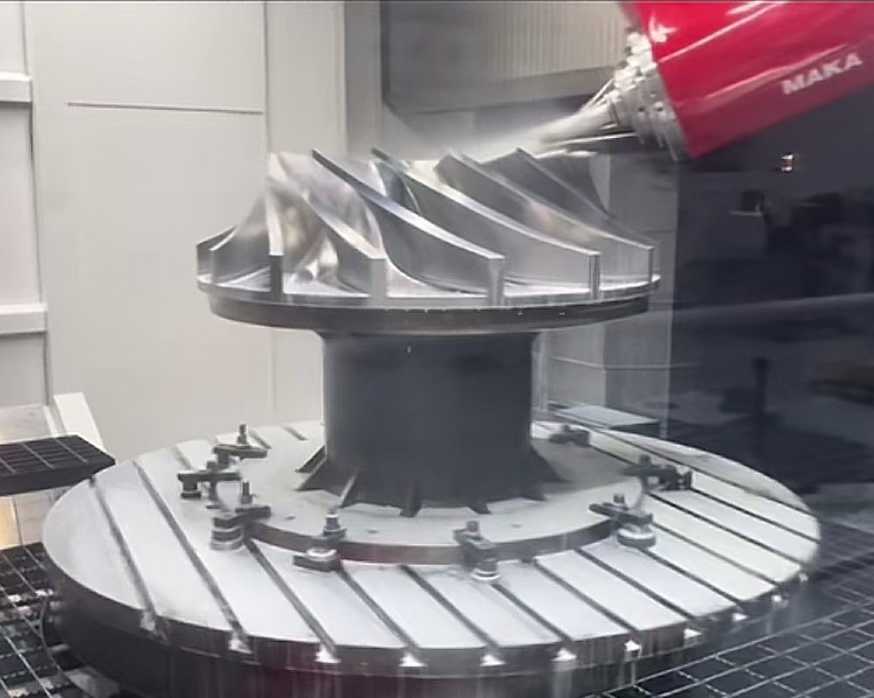
CNC coding language is the bridge between your idea and a finished product. It all starts with a design, usually created in CAD (Computer-Aided Design) software. This digital model shows exactly what you want to make. Next, the design moves to CAM (Computer-Aided Manufacturing) software, which converts that model into specific instructions—your CNC code—that tells the machine how to move, cut, or shape the material.
The CNC Programming Workflow Step by Step
- Design Creation – Begin with CAD software to create your part’s blueprint.
- Toolpath Generation – Use CAM software to plan the machine’s path based on the design.
- Post-Processing – Convert the toolpath into CNC code like G-code or M-code compatible with your machine.
- Simulation – Run the code through simulation software to check for errors or collisions.
- Uploading – Transfer the code to the CNC machine.
- Machine Setup – Position the material and set machine zero points.
- Execution – Start the machine; it follows the CNC code to make your part.
- Quality Check – Inspect the finished product for accuracy and finish.
Manual vs Automated CNC Coding Pros Cons and When to Use Each
- Manual CNC Coding
- cURL Too many subrequests.: Offers complete control and customization, great for simple jobs or quick fixes.
- cURL Too many subrequests.: Time-consuming and prone to human error.
- Use when: You need precision tweaks or your job is straightforward.
- Automated CNC Coding (CAM Software)
- cURL Too many subrequests.: Faster code generation, optimized toolpaths, easy to handle complex parts.
- cURL Too many subrequests.: Requires learning software, less flexibility for custom commands.
- Use when: Producing complex parts or running high-volume manufacturing.
Common Tools and Software for Generating CNC Code
- CAD Software: AutoCAD, SolidWorks, Fusion 360.
- cURL Too many subrequests.cURL Too many subrequests.
- cURL Too many subrequests.cURL Too many subrequests.
- cURL Too many subrequests.cURL Too many subrequests.
cURL Too many subrequests.
cURL Too many subrequests.
cURL Too many subrequests.
cURL Too many subrequests.
cURL Too many subrequests.
- cURL Too many subrequests. cURL Too many subrequests.
- cURL Too many subrequests. cURL Too many subrequests.
- cURL Too many subrequests. cURL Too many subrequests.
- cURL Too many subrequests. cURL Too many subrequests.
- G20 – Use inches for units
- G21 – Use millimeters for units
- G28 – Return to machine home position
- G90 – Absolute positioning (coordinate reference from zero)
- G91 – Incremental positioning (coordinate moves relative to current position)
- G94 – Feed per minute (sets feed rate measurement)
Mastering these will cover most of your basic machining jobs and help you read other programmers’ code.
Key M-Codes for Machine Control and Safety
M-codes handle vital machine functions beyond the toolpath. Some important M-codes include:
- M00 – Program stop (pause the machine)
- M03 – Spindle on clockwise
- M04 – Spindle on counterclockwise
- M05 – Spindle stop
- M08 – Coolant on
- M09 – Coolant off
- M30 – End of program and rewind
These keep the machine running safely and prevent crashes or overheating.
Integrating Coordinates and Parameters X Y Z and Beyond
Coordinates are how you tell the machine where to move. The usual axes are:
- X – Horizontal left to right
- Y – Horizontal front to back
- Z – Vertical up and down
But CNC machines can have more axes, like A, B, and C, for rotation or complex movements. Parameters like feed rate (F), spindle speed (S), and tool number (T) also get integrated into your code. Together, these details make sure the machine cuts exactly what you designed.
Knowing how to combine G-codes, M-codes, and coordinates into clean commands will put you on the fast track to efficient CNC programming.
Best Practices and Common Pitfalls in CNC Programming
Writing clean and efficient CNC code is key to smooth machining and fewer headaches on the shop floor. Experts at Vast suggest focusing on clarity, consistency, and simplicity in your G-code and M-code commands. Keep your code well-organized with clear comments to explain complex moves or special settings. This makes it easier to troubleshoot and modify later.
Tips for Writing Clean Efficient Code
- Use consistent formattingcURL Too many subrequests.
- cURL Too many subrequests.cURL Too many subrequests.
- cURL Too many subrequests.cURL Too many subrequests.
- cURL Too many subrequests.cURL Too many subrequests.
- cURL Too many subrequests.cURL Too many subrequests.
- cURL Too many subrequests.cURL Too many subrequests.
cURL Too many subrequests.
cURL Too many subrequests.
- cURL Too many subrequests.cURL Too many subrequests.
- cURL Too many subrequests.cURL Too many subrequests.
- cURL Too many subrequests.cURL Too many subrequests.
- Verify tool offsets and zero points: Incorrect offsets are a common source of errors.
- Consult machine logs: They often reveal hidden mechanical or communication problems.
Scaling Up From Prototypes to Production Runs
Moving from a single prototype to full production means your CNC code must be reliable and repeatable. Here’s what to keep in mind:
- Optimize cycles for speed and efficiency: Reduce unnecessary moves.
- Include clear start and end routines: Ensure the machine resets properly between runs.
- Program tool changes smartly: Minimize downtime between tools.
- Run batch simulations: Verify consistent outputs across multiple parts.
- Use version control: Track changes and improvements as you scale.
By following these best practices and watching out for common pitfalls, you’ll keep your CNC machining process lean, reliable, and ready for anything from a quick prototype to high-volume production.
The Future of CNC Coding Emerging Trends and Innovations
CNC coding language is evolving fast, and the future looks exciting. While G-code has been the backbone of CNC programming for decades, newer technologies are changing the game. AI-powered macros are making programs smarter by automating repetitive tasks and optimizing cutting paths. Conversational programming tools are also emerging, allowing operators to generate CNC code through simple, user-friendly interfaces instead of writing lines of code manually.
At Vast, we’re leading the charge in smarter CNC workflows by combining these innovations. Our software integrates AI features with traditional coding, helping U.S. manufacturers boost efficiency and accuracy. From automatic error detection to real-time code simulation, we focus on tools that reduce downtime and speed up production runs. This means less guesswork and more consistency for machine operators and programmers all across the States.
In short, the future of CNC coding isn’t just about updating G-code—it’s about making the entire process more intelligent, accessible, and reliable for American manufacturers of all sizes.
 Spanish (Spain)
  English
  Spanish (Peru)
  German
  Korean
  Italian