
Master mechanical engineering blueprints with free templates GD&T guides CAD tips and downloadable resources for students and professionals.
If you’re diving into mechanical engineering blueprints, you already know these detailed plans are the backbone of every successful design and build. But mastering how to read, create, and utilize them? That’s another game entirely. Whether you’re a student tackling your first technical drawing, an engineer sharpening your blueprint skills, or a maker hunting for free templates, you’re in the right place. This guide cuts through the jargon and delivers clear, actionable insights to help you decode complex symbols, avoid rookie mistakes, and even download ready-to-use files. Ready to unlock the full potential of your mechanical blueprints? Let’s get started!
What Are Mechanical Engineering Blueprints
Mechanical engineering blueprints are detailed technical drawings that communicate how parts and assemblies should be manufactured, assembled, and inspected. Traditionally, these blueprints were hand-drawn on large sheets of paper, often using blue backgrounds—hence the name. Today, they have mostly evolved into digital files created with CAD (Computer-Aided Design) software, making them easier to edit, share, and store.
Blueprints mainly fall into two types:
- Assembly drawings show how multiple parts fit and work together. They focus on the overall structure, part relationships, and installation instructions.
- Detail drawings zoom in on individual parts with precise dimensions, material specifications, and manufacturing instructions.
Different regions rely on standards to keep these drawings consistent and clear:
| Standard | Region | Key Focus |
|---|---|---|
| ANSI | United States | Symbols, notation, units in inches or mm |
| ISO | International | Metric units, symbology, projection methods |
Understanding the difference between assembly and detail drawings, and knowing which standards apply, helps engineers avoid costly mistakes and ensures everyone is on the same page whether in design, manufacturing, or quality control.
Blueprint Components Every Engineer Must Know
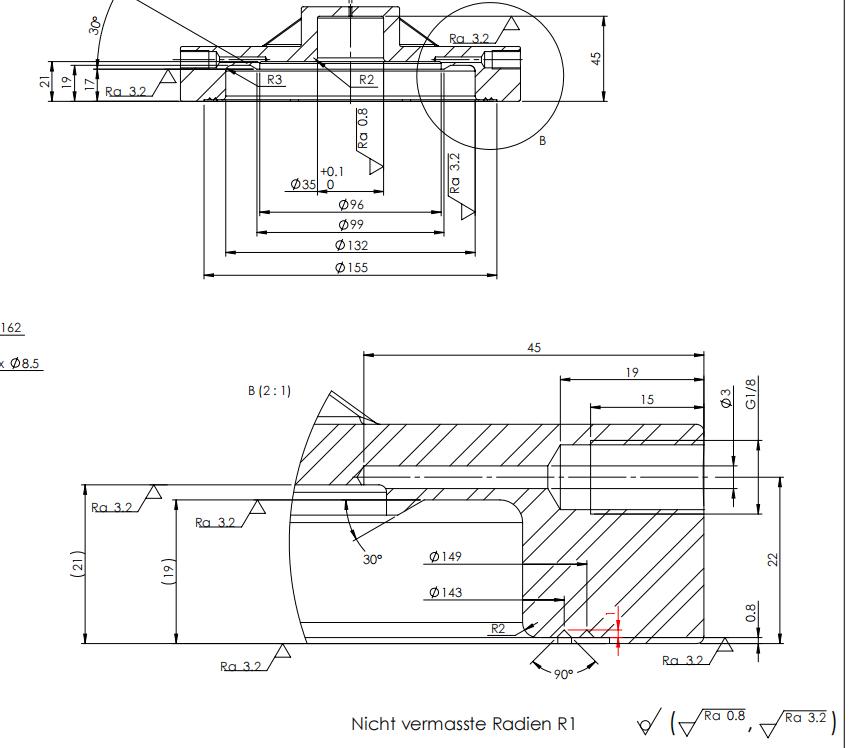
When working with mechanical engineering blueprints, knowing the key components is essential for accuracy and efficiency.
Title Block and Metadata
The title block is your blueprint’s ID card. It includes vital information like the project name, part number, designer, approval signatures, and revision history. In many modern workflows, a digital stamp is added here to protect intellectual property and track document authenticity.
Views and Orthographic Projection
Blueprints use multiple views to show every detail clearly. The most common method in the U.S. is the third-angle orthographic projection, where the front, top, and side views are laid out logically. Understanding these views helps you visualize the 3D part from 2D drawings.
Dimensions and GD&T Callouts
Dimensions tell you the size and location of features, but geometric dimensioning and tolerancing (GD&T) symbols provide precise controls on form, fit, and function. Many use a digital tolerance calculator linked to CAD software like vast。 to ensure these tolerances are practical and stack correctly.
Bill of Materials Parts List
The Bill of Materials (BOM) lists every part needed for assembly or manufacturing. CAD plugins, such as the vast。 CAD plugin, allow you to export the BOM easily from your digital drawing, streamlining ordering and inventory.
Master these components and you’ll understand the detailed language of mechanical engineering blueprints like a pro.
How to Read Mechanical Blueprints Like a Pro

To read mechanical engineering blueprints like a pro, start by focusing on the title block and revision history. This area gives you key metadata like who created the drawing, when it was last updated, and what part or assembly you’re looking at. Knowing this helps you avoid using outdated or incorrect versions.
Next, identify the primary views—usually the front, top, and side views. These orthographic projections show the part from different angles, giving you a complete picture of the design. Recognizing these views makes it easier to understand the shape and features of the component.
Pay close attention to line types. Solid lines represent visible edges, while dashed lines indicate hidden features. Centerlines are usually dashed-dot patterns and mark axes of symmetry or holes. Section lines show cut surfaces in sectional views. Decoding these correctly is key to visualizing internal details you can’t see otherwise.
Mastering GD&T symbols (Geometric Dimensioning and Tolerancing) is a game changer. These symbols specify allowable variations in form, orientation, and location. Use interactive glossaries or cheat sheets to quickly identify what each symbol means. This skill lets you understand how precise a part needs to be and which features are critical.
Finally, always cross-check tolerances with actual machining or manufacturing capabilities. Some tight tolerances can be costly or impossible to meet depending on your production setup. Knowing this upfront helps avoid costly rework or delays.
By following these steps and getting familiar with the blueprint’s language, you’ll read mechanical drawings clearly and avoid costly mistakes.
Creating Your First Mechanical Engineering Blueprint Step-by-Step
Starting your first mechanical engineering blueprint might feel overwhelming, but breaking it down makes it manageable. Here’s a quick rundown of the essential tools and workflow to get you going.
Essential Tools to Use
- AutoCAD – The industry classic for 2D drafting, widely used in the U.S.
- SolidWorks – Great for 3D modeling with built-in 2D drawing features.
- Fusion 360 – A flexible CAD tool with a free tier perfect for beginners.
- vast。CAD Plugin – A handy digital assistant that integrates with these platforms to streamline your workflow and improve accuracy.
Basic Workflow for Creating Blueprints
- Start with a Sketch – Draw rough ideas on paper or digital sketch apps.
- Build a 3D Model – Use SolidWorks or Fusion 360 to create the part or assembly in 3D.
- Generate 2D Drawings – Extract detailed views and sections from the 3D model.
- Add Annotations and Dimensions – Include all necessary measurements, GD&T callouts, and notes.
- Finalize Title Block and Metadata – Fill in project info and revision data for clarity.
Common Rookie Mistakes and How to Fix Them
- Poor Dimensioning – Avoid cluttering drawings; only show what’s essential.
- Missing Tolerances – Always specify tolerances—use vast。’s tolerance calculator to make this easier.
- Ignoring Standard Views – Stick to front, top, and side views with correct projection methods (third-angle for U.S.).
- Skipping Revision Tracking – Keep a clear revision history in your title block to avoid confusion.
Get Started Faster with Free Templates
Save time and learn by example with the vast。starter template pack. It includes 5 free DWG files designed for beginners ready to pick up mechanical drawing templates and jump straight into blueprint creation.
By following this step-by-step approach and using the right tools, you’ll be reading and making professional mechanical engineering blueprints in no time.
Free vs Premium Blueprint Libraries
When you’re starting out or need quick access to mechanical engineering blueprints, free libraries are a great place to look. Here are the top 5 free repositories you’ll want to check:
- TraceParts – Offers millions of 3D models and 2D drawings suitable for many industries.
- GrabCAD – A community-driven platform with a vast collection of user-uploaded CAD files.
- Part Community – Provides standard parts and components with customizable options.
- 3D ContentCentral – Features supplier-certified 3D models and drawings ready to download.
- CADdetails – Focuses on building products but also has mechanical components and drawings.
These free resources are perfect for students, hobbyists, or engineers who need a quick reference. However, as your projects grow in complexity, it may be time to upgrade.
The vast。 Pro Library offers over 10,000 verified, high-quality blueprints designed for professional use. This premium library saves time with trusted data, reduces errors, and integrates seamlessly with your CAD software.
Before upgrading, use an ROI calculator widget to weigh the benefits against costs. It helps determine if the time saved and improved accuracy justify the investment, especially for businesses in the competitive U.S. market.
Whether free or premium, these libraries are essential tools for any mechanical engineer who wants to streamline their blueprint workflow and ensure accuracy.
Industry Specific Blueprint Examples
Mechanical engineering blueprints vary a lot depending on the industry. Here are some practical examples that show how different sectors use these drawings — plus, you can download sample files to try out yourself.
Automotive Blueprints
- Focus: Section views of castings and machined parts
- Why it matters: Helps engineers understand internal shapes and assembly fit
- Download: Get sample DWG files showing engine and suspension castings with clear section views
Aerospace Blueprints
- Focus: Composite layup schedules and lightweight structural parts
- Why it matters: Critical for building strong, light components that meet strict safety standards
- Download: Sample blueprints with layered composite schedules and detailed material callouts
Consumer Goods Blueprints
- Focus: Design for Assembly (DFA) annotations and simple part breakdowns
- Why it matters: Ensures easy manufacturing and quick assembly while keeping quality high
- Download: Examples include household gadgets and wearables with clear DFA notes and BOM lists
These industry-specific blueprints help you see real-world applications and adapt best practices for your own projects. Downloading and studying these can speed up your learning and improve your mechanical blueprint skills.
Future of Mechanical Engineering Blueprints Digital Twins and MBD

The future of mechanical engineering blueprints is digital, and it’s transforming how engineers design, review, and manage projects. The shift towards Model-Based Definition (MBD) using standards like ASME Y14.41 means that 3D models now carry all the data traditionally found in paper drawings—dimensions, tolerances, notes—all embedded directly into the CAD model. This not only reduces errors but speeds up manufacturing and inspection.
Augmented Reality (AR) overlays are becoming common on the shop floor. With AR viewers, engineers and machinists can visualize digital blueprints right on the physical parts or machines, making assembly and quality checks faster and more intuitive. Demo platforms show how these overlays align exact design specs with real-world components, reducing rework and training time.
Blockchain is also stepping in to enhance revision control of blueprints. By securely tracking every change and approval, blockchain provides an unalterable history that improves collaboration and IP protection, critical for high-stakes projects where version accuracy is a must.
All these technologies are making mechanical blueprints smarter, digital, and more connected to the entire production lifecycle. This evolution supports U.S.-based engineers aiming to keep pace with global manufacturing demands while enhancing efficiency and precision.
Mechanical Engineering Blueprints FAQ
What software opens DWG files for free
If you’re working with mechanical engineering blueprints, DWG files are common. Good news: several free programs can open them, including Autodesk DWG TrueView, FreeCAD, and LibreCAD. These tools let you view and sometimes edit blueprints without paying for expensive software.
How accurate do student blueprints need to be
Student blueprints don’t have to be perfect, but accuracy matters. Focus on clear dimensions, proper use of symbols (like GD&T), and following standards like ASME Y14.5. Accuracy helps you learn how to communicate designs effectively, even if tolerances aren’t as tight as professional projects.
Can I 3D print directly from a blueprint
Not quite. Blueprints are 2D drawings meant for manufacturing and assembly instructions. To 3D print, you’ll need a 3D CAD model, which you can create based on the blueprint’s details. Tools like SolidWorks or Fusion 360 can help turn blueprints into printable 3D models.
By understanding these common questions, you can navigate mechanical engineering blueprints with more confidence and avoid some early-stage frustrations.
 Chinese
  English
  Spanish (Peru)
  German
  Korean
  Spanish (Spain)
  Italian