
Discover expert tips on designing, printing, and troubleshooting 3D printing threads for perfect fits using Fusion 360 and advanced slicer settings.
Why 3D Printing Threads Matters Benefits and Common Pitfalls
Ever tried assembling a 3D printed part only to find the threads don’t fit or strip out instantly? That’s why understanding 3D printing threads is a game changer. Threads let you join parts securely without glue or complex hardware, making your projects cleaner and more functional.
Why Threads Matter in 3D Printing
- Secure assemblies: Threads allow for easy disassembly and reassembly.
- Cost-effective: No need for extra metal fasteners or complicated tools.
- Customization: You can design custom thread sizes and profiles for unique projects.
- Time saver: Integrating threads directly into the print reduces post-work.
Benefits Over Traditional Threading Methods
- No tapping needed: You can print threads directly instead of cutting them post-print.
- Less material waste: Traditional machining wastes more material.
- Faster prototyping: Instant functional threads without additional steps.
- Lightweight parts: Printed threads keep parts light compared to metal inserts.
Common Pitfalls and Why They Happen
- Poor fit due to printer tolerance: Most FDM printers can’t hit super tight thread tolerances.
- Layer adhesion issues: Threads printed with thin layers might be weak and strip easily.
- Overhang problems: Thread peaks can suffer from drooping if not oriented right.
- Material challenges: Not all filaments hold threads equally—PLA might strip faster than nylon.
- Design flaws: Incorrect thread pitch or size leads to binding or loose fits.
Getting threads right means balancing design, materials, and printer settings carefully. But the payoff? Easy, strong, and reusable connections for all your 3D printed builds.
Essential Design Principles for 3D Printed Threads
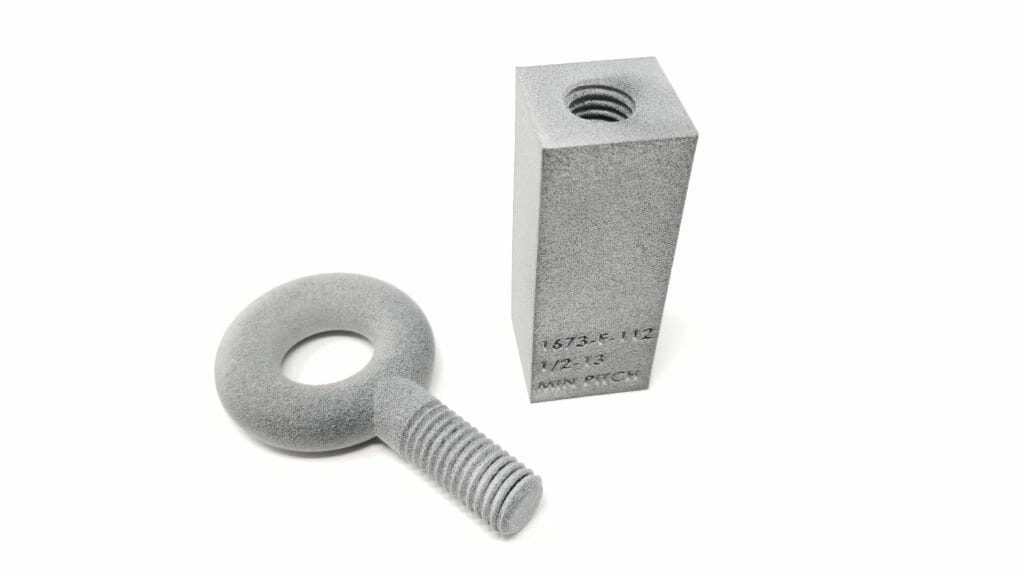
Designing 3D printing threads requires a careful approach to get strong, reliable results. The key is knowing that 3D printed threads don’t behave exactly like traditional metal threads. You want to allow extra clearance for the layers since FDM printers tend to add slight thickness or roughness. A good rule of thumb is to increase the thread pitch and diameter slightly beyond standard sizes for better fit and easier assembly. Avoid too sharp or fine threads because they can be weak and tricky to print.
Thread Types and Standards for 3D Printing
Most 3D printed threads follow common standards like metric screw threads (ISO) or Unified Thread Standard (UTS) designs. These provide a good starting point for compatibility but may need tweaking for your specific printer’s tolerances. You’ll often see:
- Internal threads (female) inside holes for screws or bolts.
- External threads (male) on rods or shafts.
Knowing the thread type you need helps in picking the right model or standard. For example, use self-tapping screws with 3D printed holes to improve grip in softer materials.
Modeling Threads in CAD Step-by-Step Guide
Using CAD software like Fusion 360, you can create precise threads by:
- Selecting the thread tool in your modeling software.
- Choosing the thread type and size (metric or UTS).
- Applying internal or external threads based on your design.
- Adjusting the dimensions to match your printer’s tolerance and filament behavior. For example, slightly larger clearances for PLA or nylon filament.
- Exporting the model for slicing.
This method ensures you get consistent threads ready for printing or post-processing like tapping.
Internal vs External Threads Key Differences
Both internal and external threads have unique challenges in 3D printing:
- Internal threads can be harder to print cleanly because of overhangs and limited access for post-processing like tapping or inserting threaded inserts.
- External threads tend to be easier to clean up and often stronger since they have better cooling and layer adhesion.
When designing internal threads, consider adding threaded inserts for 3D prints if strength is critical. For external threads, focus on smooth curves and orientation to avoid rough edges from layer lines.
By balancing these design principles, thread types, and CAD modeling tricks, you’ll have a much better chance of printing strong, functional 3D threads.
Optimizing Your Slicer Settings for Flawless 3D Printed Threads
Getting perfect 3d printing threads starts with dialing in your slicer settings. Small tweaks here can make a big difference in thread quality and strength. Here’s what to focus on:
Layer Height Speed and Orientation Best Practices
- Layer Height: Keep it low, around 0.1mm to 0.2mm, for smooth thread profiles and better detail. Thinner layers reduce the chance of rough or uneven threads.
- Print Speed: Slow down to about 30-40 mm/s when printing threads. Slower speeds improve accuracy and help avoid gaps or blobs in tight thread areas.
- Orientation: Align threads so their axis runs vertically or as close to vertical as possible. This reduces overhangs in the thread profile and improves layer adhesion.
Material Selection PLA PETG Nylon and More
- PLA is beginner-friendly with good detail but can be brittle if threads get forced.
- PETG offers more flexibility and stronger threads, resisting cracks better especially in functional parts.
- Nylon is the toughest option, excellent for durable, load-bearing threads, but requires higher print temps and careful moisture control.
Choosing the right filament depending on your project needs is key for lasting threads.
Slicer Specific Tweaks PrusaSlicer Cura Bambu Studio
- PrusaSlicer: Use the “Perimeter” settings to increase the number of perimeters to at least 3 for strong thread walls. Enable “Detect Thin Walls” to capture all thread details.
- Cura: Activate “Enable Ironing” for smoother thread tops and fine-tune “Initial Layer Flow” to help with bed adhesion. Adjust “Wall Line Count” to boost thread strength.
- Bambu Studio: Utilize adaptive layer height for better resolution in small thread details and experiment with slower speeds on thread layers.
Each slicer offers tools to optimize threads—taking time to explore these can greatly improve your print results.
By carefully adjusting these slicer settings and selecting the right material, you’ll avoid common issues like thread fuzziness, weak walls, or poor fit. This makes your 3d printing threads sturdier, smoother, and ready for real-world use.
Printing and Post Processing Techniques for Reliable Threads
Getting strong, reliable threads from 3D printing takes more than just hitting print. Here’s a simple workflow to help you nail it and a quick look at when it’s better to use alternatives.
Step-by-Step Printing Workflow
- Prepare Your Model: Double-check your thread design and make sure it matches standard sizes or the exact fit you need.
- Choose the Right Orientation: Print threads vertically when possible to improve layer adhesion and avoid overhang issues.
- Set Proper Layer Height: Use a smaller layer height (like 0.1-0.2mm) for cleaner thread edges.
- Adjust Print Speed: Slower speeds help maintain thread accuracy and reduce stringing, especially on detailed threads.
- Enable Support or Use Custom Supports: For internal threads with overhangs, light supports can keep the shape from sagging.
Post-Processing Essentials
- Tapping Threads: Even well-printed threads sometimes need light tapping with a proper tap tool to clean up rough edges and ensure smooth screwing.
- Using Threaded Inserts: If you want durable threads, consider heat-set or press-fit threaded inserts. They add real metal strength, perfect for frequent assembly.
- Finishing Touches: Light sanding or chemical smoothing (when safe for your material) can reduce friction on threads.
When to Skip Printed Threads and Use Hybrid Alternatives
Sometimes printing threads isn’t the best move. If you face issues like weak strength or binding, try these options:
- Use Threaded Inserts: Great for strong, reusable threads in PLA, PETG, or Nylon prints.
- Design Snap-Fit or Clip Mechanisms: Avoid threading altogether for quick connects.
- Add Metal Nuts or Bolts After Printing: Combining 3D parts with standard hardware can give you the best of both worlds.
By following these printing and post-processing steps, you can get reliable and strong threads out of your 3D prints with less hassle. But don’t hesitate to mix in inserts or other methods when needed — sometimes a hybrid solution works best for long-term durability.
Troubleshooting Common 3D Printing Threads Issues
When 3D printed threads bind or strip, it’s usually because of design flaws, printing settings, or material choice. Here’s how to spot the problem and fix it:
Why Threads Bind or Strip
- Incorrect thread size or tolerance: Threads that are too tight won’t screw in smoothly, causing binding or even stripping.
- Poor layer adhesion: Weak layers can cause threads to tear out under pressure.
- Overhang issues: Threads printed on steep angles without support can deform and lose accuracy.
- Using brittle filament: Materials like PLA can break under stress, making threads prone to damage.
- Wrong printer settings: Speed, layer height, or flow rates can affect thread precision.
Diagnosis and Fixes
- Check measurements: Compare your printed threads with your CAD model to ensure proper dimensions.
- Adjust tolerances: Add 0.2 to 0.3 mm clearance on internal threads to avoid tight fits.
- Optimize print orientation: Print threads vertically to reduce overhang and improve surface finish.
- Use stronger materials: Switch to nylon or PETG for better durability.
- Calibrate your printer: Slow down printing speed and reduce layer height for finer details.
- Consider tapping: For internal threads, post-process holes by tapping them to clean up and strengthen the threads.
Strength Testing Pull-Out and Durability Checks
Once you fix the fit, test thread strength by:
- Performing screw pull-out tests: Apply gradual force to check if the threads hold firm.
- Repetitive screwing: Screw and unscrew parts multiple times to test durability.
- Inspect for cracks or deformation: Look closely for any layer delamination or surface damage.
By troubleshooting these common issues and testing thread strength, your 3D printed parts will have reliable, lasting threaded connections suited for real-world use.
Advanced Tips and Case Studies for Pro-Level 3D Printed Threads
When you’re ready to go beyond basics, mastering pro-level 3D printing threads means scaling up and handling multi-part assemblies with complex thread profiles. Here are some advanced tips to help you nail it every time:
- Scaling Up Multi-Part AssembliesPrinting threads that fit perfectly in larger assemblies takes careful calibration. Keep thread tolerances tight but allow room for material expansion or shrinkage, especially with flexible filaments like Nylon. Always test fit parts before full assembly to avoid binding.
- Custom Thread ProfilesDon’t just stick to standard metric screw threads. Custom profiles modeled in Fusion 360 or other CAD tools let you create specialized fits that improve strength or reduce wear in your designs. These custom threads are ideal for unique projects or parts that need a better grip.
- Optimizing Thread OrientationOrient threads vertically to reduce overhangs and improve layer adhesion. This helps prevent weak spots and layer lines that can cause threads to strip or bind under pressure.
- Post-Processing and Inserts UpgradeFor parts requiring extra durability, tapping threads after printing or using threaded inserts can significantly boost performance. This is especially important in high-stress areas or when using softer filaments.
Real World Examples from Vast Projects
- Functional PrototypesEngineers use 3D printed threads in quick-turn prototypes that need fast assembly without metal parts. Properly designed printed threads speed up iterations and lower costs.
- Custom Tooling and JigsMulti-part tools with integrated threads allow for adjustable components and part swaps. This flexibility saves time on production lines and repair kits.
- Hobbyist Builds and RepairsMakers often print replacement thread parts for household items, drones, or RC cars. Printing threads at home avoids long delays waiting for metal screws or parts.
By combining these advanced techniques and real-world strategies, you can push your 3D printing threads from simple fixes to professional-grade solutions that hold up in demanding US market applications.
 English
  Spanish (Peru)
  German
  Korean
  Spanish (Spain)
  Italian